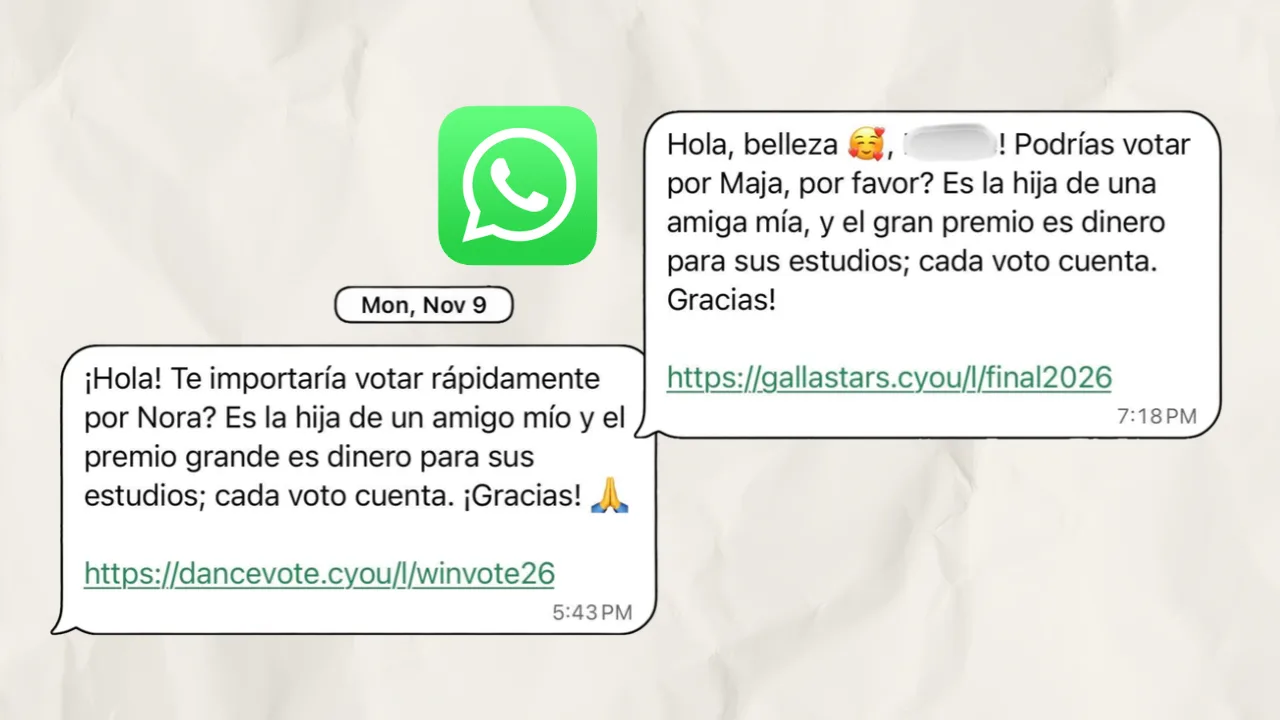
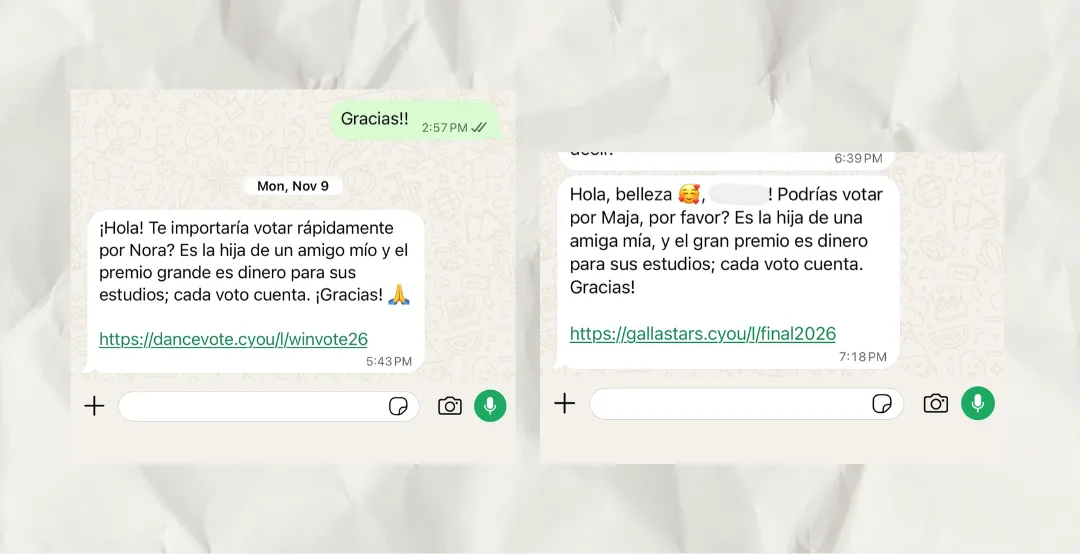
Don't fall for the "Maja" scam on WhatsApp. If you receive a message through the app from a friend, family member or acquaintance asking you to vote for "Maja" or anyone else in a contest, don't tap the link. It's a scam and can give other individuals access to your account.
These messages are reaching users in Puerto Rico from the numbers of family members, friends and coworkers whose accounts have already been compromised. It is, however, a type of fraud that has been seen in other countries, with different names and prizes adapted to the audience the scammers are trying to deceive.
Jeyliza Pérez Reyes, director of risk management and cybersecurity at Driven Advisors, confirmed to Platea that these WhatsApp messages are a form of smishing.
"Typically, when an attacker tries to make some kind of approach to the general public, it's with the intention of obtaining some type of sensitive information," Pérez Reyes explained.
How this scheme works
A San Juan resident who received the message told Platea that she initially fell for it after receiving the message from a coworker's WhatsApp. When she clicked the link, she landed on a website that appeared professional, with photos of different girls who were supposedly participating in the contest.
When she selected "Maja" from among the images of the girls listed, it took her to another page resembling a Google Form, which asked for her name and email. At that point, the page seemed suspicious to her and she closed it.
Spain's Instituto Nacional de Ciberseguridad (INCIBE) documented this same scheme in an Oct. 21 advisory, under a different name. In that case, votes were being solicited for a girl named Sophie, with the promise of a scholarship and a spot on stage.
The link takes you to a page that looks like a voting form. It asks for your phone number and shows you a code, with instructions to enter it in WhatsApp under the option to link a device.
That code does not register any vote. What it does is connect the scammer's device to your account. From that session, the scammer writes to your contacts. The fact that your WhatsApp keeps working does not mean no one else is using it.
Poincaré Díaz Peña, executive director of the Puerto Rico Innovation and Technology Service (PRITS), explained to Platea that the code functions as a second authentication factor. Once you enter it, whoever is behind the scam has your number and the validation code, and with that they take control of your account and your contacts.
According to Díaz Peña, what is circulating could be seen as the first phase of a fraud scheme.
"The idea is to compromise more and more accounts. This is the first phase. The second is to make an approach: 'Look, I have a problem, I need you to send me this much money,'" he explained.
In that second phase, the goal is to commit fraud, either by asking your contacts for money or information. Díaz Peña confirmed that, if the message reached you from someone you know, that person fell for the scheme.
The psychology behind the scheme
This type of scheme for compromising accounts relies on social engineering. According to Pérez Reyes, this tactic consists of "appealing to human psychology in order to obtain sensitive information that could not otherwise be obtained."
Although she has not looked at the "Maja" scheme in detail, Pérez Reyes explained that when the attack targets an individual rather than an organization, it seeks sensitive information such as credentials, meaning your username and password.
According to the expert, these messages play on a range of emotions. Some offer an incentive, such as a prize or reward for answering a questionnaire or tapping a link. Others appeal to fear and urgency, such as a transaction that supposedly needs to be authorized immediately.
"In many cases they don't have enough information, and through the emotion they want to evoke in us, we react. We don't necessarily sit down to analyze it", she pointed out.
How to recognize a suspicious message
Pérez Reyes's first piece of advice is to "stay calm and study the message carefully", and to pay attention to the tone, the urgency and how it is worded.
She also recommended checking the web address (URL) before entering any information. Many fake pages change or reverse a letter in the real name, something that is not easy to catch at a glance. Before continuing, confirm that you reached the page you intended to visit.
Another sign is the way they contact you. According to the cybersecurity specialist, when an organization detects suspicious activity, it typically notifies you by email or through its own app and asks you to reach out to it. Except in the case of its fraud center, it is usually not the other way around.
In the case of the government, Díaz Peña indicated that there is no sign that this fraud is affecting agencies. Some use WhatsApp as a direct channel with the public, but only for general information, such as hours or how to complete a process. Confidential information, such as your Social Security number or date of birth, is not requested through that channel.
Offers are not announced on social media, either. "The government does not offer any kind of service or deal, such as 50% off fines or electricity and water bills, on social media", she said. To confirm any service, go to the agency's official portals under pr.gov.
WhatsApp recommends that you pay attention, pause and question the source when a message:
Asks you to tap a link, activate something through a link or download an app.
Asks you to forward it.
Asks you for money, or tells you that you have to pay to use WhatsApp. The app is free.
Asks you for personal information, such as card or bank account numbers, your date of birth or passwords.
Comes from someone pretending to be a person you know.
Mentions lotteries, games, jobs, investments or loans.
Contains spelling or grammar errors.
If you opened the "Maja" link or entered your number
Close the page and do not follow the instructions. According to INCIBE, opening the link or entering your number is not enough for them to link your account. What links it is entering the code in WhatsApp. Even so, check your linked devices and stay alert to strange messages or requests.
Keep your phone's operating system (software updates) and the WhatsApp app up to date.
If you received the message and did nothing
Do not open the link or enter your number on the page.
Call the person who sent it to let them know what is happening (without using the WhatsApp app).
Do not forward the message. If your contact is spreading it without knowing, let them know by phone call or through another social network.
Take a screenshot of the message. You can then report it from WhatsApp and delete it. If the sender is an unknown number, you can also block it.
If you entered the code or messages are being sent from your account
Díaz Peña recommended changing your passwords and codes. WhatsApp has a process to recover access to your account and remove any access by outside parties.
Close any sessions you don't recognize.
On Android, open WhatsApp, tap the three dots and go to Linked devices (Linked devices).
On iPhone, tap your profile photo in the lower right corner and then go to Linked devices (Linked devices).
Tap each device that isn't yours and select Log out.
Alert your contacts through another channel. Tell them not to open the link or send money. Do not forward the link to warn them.
Save the evidence. Keep the chats, screenshots, the page address and the dates. Ask your contacts to save the messages they received.
Turn on two-step verification. In WhatsApp, go to Account (Account), then to Two-step verification (Two-step verification). Create a PIN and add a recovery email that only you use. Do not share that PIN or any codes you receive by SMS.
Confirm that everything has stopped. Check the linked devices again. If new sessions appear, messages are still going out, or you've lost access, contact WhatsApp's official support.
Habits that offer greater protection for your accounts
Pérez Reyes warned that "nothing is foolproof, there is always some margin of error." Even so, he recommended these habits to add layers of protection:
1. Turn on multi-factor verification. Many platforms already offer it, but some people don't enable it because they see it as a nuisance. If someone gets your username or password, that extra step helps confirm that the person trying to log in is you.
2. Don't use the same password for everything. If an attacker compromises your credentials on one platform, they will try to use them on others. "If they realize you use the same credential, your entire digital library is compromised," he explained.
4. Change your passwords periodically. Some organizations require it every 45 to 90 days.
5. If someone calls you, listen before giving out information. According to the expert, the attacker often has incomplete information and uses urgency to get you to supply what's missing.
6. Be careful about the networks you connect to. Díaz Peña warned that every new device or every visitor who connects to your home network can introduce a vulnerability. The same applies when you connect your phone to free public internet without protection.
Verify before you respond
Díaz Peña warned that these fraud strategies and attempts will become increasingly sophisticated with artificial intelligence, which is already being used to imitate voices and images and to create videos, avatars and calls.
His recommendation is that families choose a phrase or keyword to confirm that the person calling or writing is who they say they are. "Just as emergency plans are made for when a disaster occurs and the family establishes a meeting point, families should likewise establish a phrase, a keyword", he said.
If the call appears to be from a company, such as a bank wanting to verify your account, the director suggests hanging up and calling the official number yourself. The same applies to messages saying you won a prize, such as a bus. Before responding or tapping a link, verify the official source.
"Cybersecurity is a responsibility not only of the government, it is also a responsibility of us as citizens", Díaz Peña pointed out. "We have not only a physical life, we also have a digital life that needs to be protected in the same way", he added.
This content was translated with the assistance of Artificial Intelligence (AI).